
📝 1. Accounts Preparation
First, let’s start by creating the accounts (those who already have them can skip these steps):
- Obviously, start by creating a new free Stremio account.
- Choose a Debrid service for caching the torrents, create an account on it, buy a subscription, and get the API key.
- This is optional, but HIGHLY recommended. This guide also works for free P2P and/or HTTP streams only, but Debrid works much better than both, if you can afford it.
- In case P2P is an issue in your country: If you use Debrid (paid) or HTTP (free) streams, you are generally safe and don’t need a VPN. Debrid however is still the safest and most reliable solution. You will choose which you prefer during the AIOStreams template import later.
- For those who don’t know, this is the only thing you will be paying for (about 32€ for Real-Debrid or $33 for TorBox for 12 months). It’s used as an intermediary to serve the files to you from their servers, instead of relying on torrent which may be slow and inefficient. This means faster loading, almost no buffering, and more high-quality stream options. I would definitely recommend getting this.
- I use mainly TorBox, as a backup I use Real-Debrid (these are referral links since we’re at it :), two of the best platforms, with the best prices and very stable.
- For TorBox, please make sure to use my referral code when ordering: f7feee59-8c0d-4842-b53a-07738c37f7f1 to get 7 additional days for each month you buy (only for the first purchase, so I recommend you go big from the start and buy the yearly, it’s a better value and you get 84 additional days for free). You can also buy the cheapest tier for a year initially to get the extra 3 months, and if you need a higher tier, you can upgrade along the way, it is possible. IMPORTANT: When you’re on the subscription plans page, scroll down to the bottom and you’ll see a field (not the “Coupon Code” field just below the plans, but to the very bottom of the page) where you can enter my code (not to be confused with the “Your referral code is:” part above it) and click Submit (see screenshot below, marked in red). Then you can proceed with buying your chosen plan. ALSO, if you pay with crypto, you can use coupon code SIGMA30 in the “Coupon Code” field for a further 30% discount (only for the first purchase if you select the One-Time option).
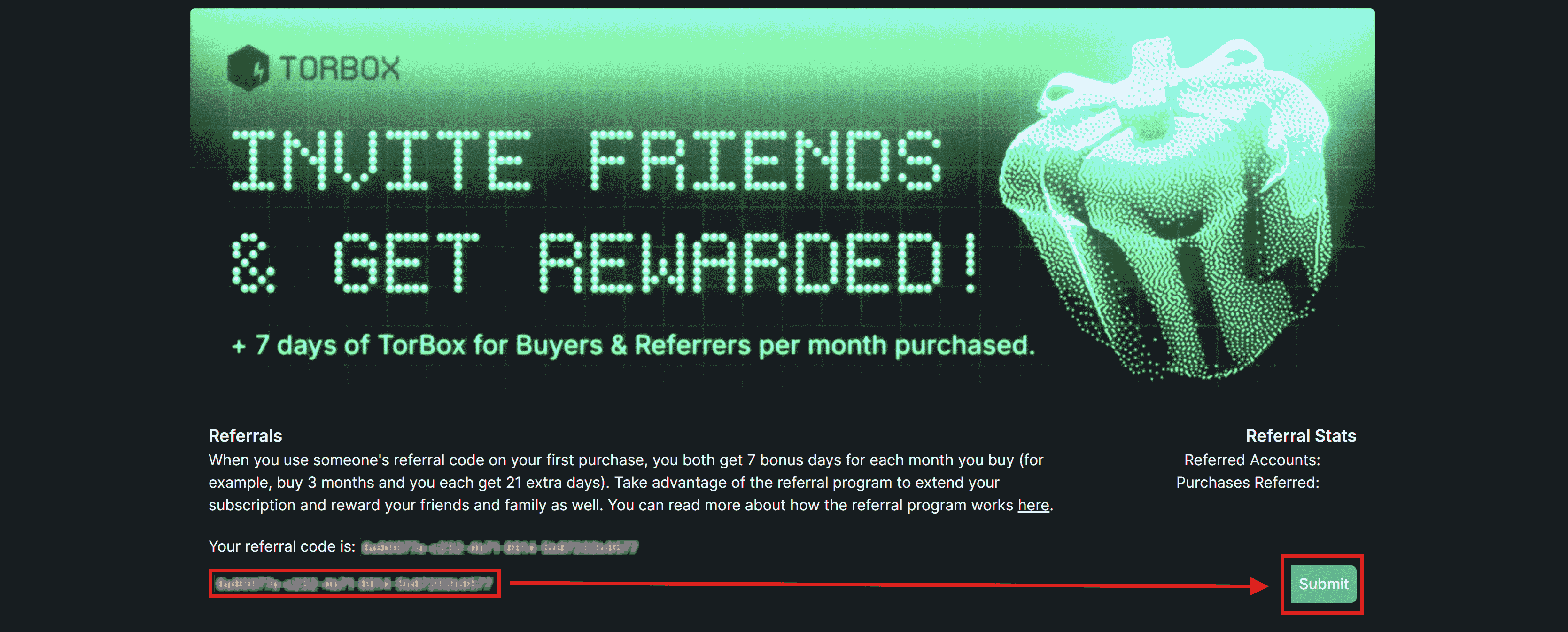
- To help you choose between Real-Debrid and TorBox:
- Real-Debrid is one of the most widely used service, and has probably the largest cache (files already available on their servers and ready to watch) of shows and movies. However, they only allow one connection at a time, meaning that you can’t watch on two or more devices simultaneously (you can log in to your Stremio account on as many devices you want, that’s unrelated). So if you want to use it with friends or family or on multiple Stremio accounts to watch simultaneously, you can’t: you’ll get a warning and may risk getting banned if repeated. HOWEVER, if your devices are sharing the same internet connection, for example when on the same WiFi at home, you can watch from multiple devices connected to it because then Real-Debrid sees only one public IP address, regardless of how many devices are in your home network.
- TorBox allows in its most basic paid option up to 3 parallel connections, and has tiers with up to 10 parallel connections, which means that you can use the same API key for e.g. your entire family or friends, or multiple Stremio accounts. According to some users, and appears to be official, these parallel slots are only counted when downloading uncached content (⏳) that is not immediately available, whereas for cached content (⚡) already on TorBox, the only limit is bandwidth. This means that you can watch as many streams in parallel as you want in all tiers, but the speed may be capped at 1Gbps (or 80Gbps for Pro), although they are tolerant enough to allow even higher speeds if you don’t abuse it. However, TorBox may not have the large cache of readily available shows like Real-Debrid has, so it might happen that you cannot watch a show immediately because it needs to download it first (you see that in the source links marked with an hourglass icon. This may take time depending on the seeders available, but it’s also usually fast). It usually has more than enough options cached for each show though, and you only need one :).
- The choice is yours. TorBox would be very practical and cheaper for multiple screens or families, but Real-Debrid would MAYBE provide more immediately available options. I myself use both (you can enable both in AIOStreams, and considering the prices for both, it’s still cheap): I use TorBox as my main, because my family can safely use it simultaneously, and I also keep a backup Real-Debrid, in case it may happen that Real-Debrid has a result that TorBox doesn’t immediately have (always keeping in mind though that Real-Debrid only allows 1 connection, hence as a backup only).
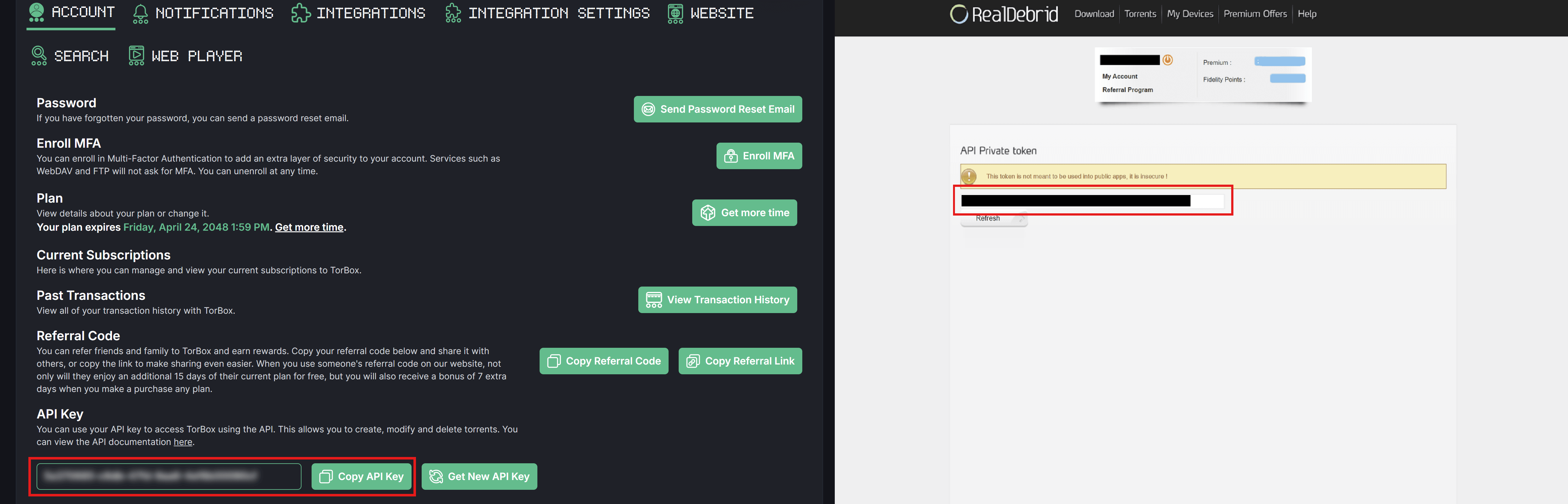
- ONLY AFTER you registered to one or both services from the links above and subscribed to a plan (and paid for it), you can get the API key while logged in to your account directly on this link for Real-Debrid or here for TorBox.
- Create a free Trakt account.
- This is recommended for tracking what you watch, and getting some custom lists. Makes the Stremio experience more like Netflix. If your account is new, rate or mark as watched at least 10 movies and 10 shows, it will be good for creating custom lists later below, otherwise they won’t work.
- Create a TMDB account and get a free API key:
- TMDB is used for the metadata (descriptions, cast, etc.) of Movies.
- Click on your profile icon on the top right and click on “Settings”.
- Click “API”.
- In the “Request an API Key” click on “To generate a new API key, click here”.
- Click “Yes” when asked “Is the intended use of our API for personal use?”.
- Fill the form with whatever info (doesn’t have to be correct), and click “Subscribe”.
- When successful, you will get taken to a page that reads “You are currently on the Free Developer plan.”, and click on “Access your API key details here”.
- Copy the “API Read Access Token” and the “API Key”.
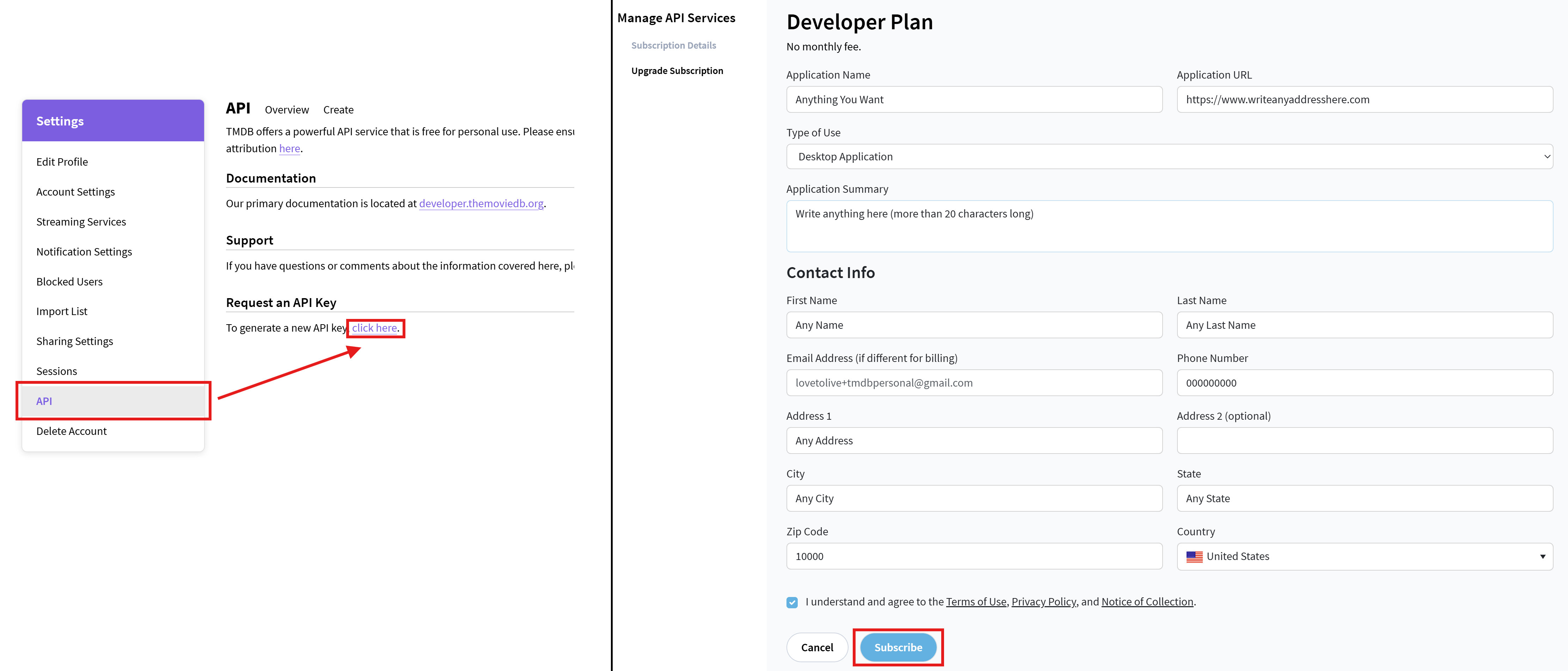
- TMDB is used for the metadata (descriptions, cast, etc.) of Movies.
- Create a TVDB account and get a free API key:
- TVDB is used for the metadata (descriptions, cast, etc.) of Series.
- After being logged in to your account, go to this page.
- Select any options from the checklist that shows and click “Save”.
- Click “Get Started”.
- Make sure “Less than $50k per year” is selected in “Company / Project Revenue”, fill the rest with whatever info (doesn’t have to be correct), and click “Submit”.
- Copy the API key that is shown on the “API Signup Success” page.
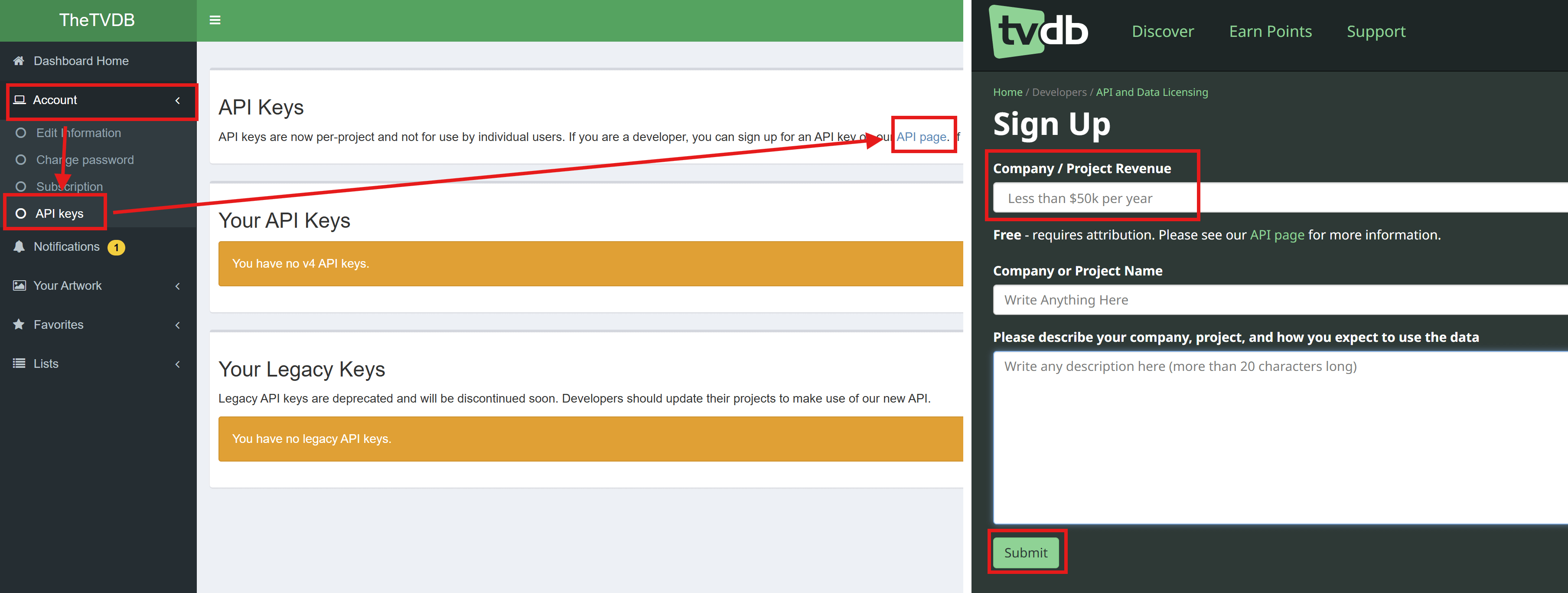
- TVDB is used for the metadata (descriptions, cast, etc.) of Series.
- Create a Google/Gmail account if you don’t have one, and get a free Gemini API key:
- Optional, but recommended for AI searches, to search not only for movie or show names, but also e.g. “movies like Batman” or more complex searches.
- When logged in to your Google account, go to Google AI Studio.
- Accept the agreement if it’s your first time opening it, by enabling the checkbox and clicking “Continue”.
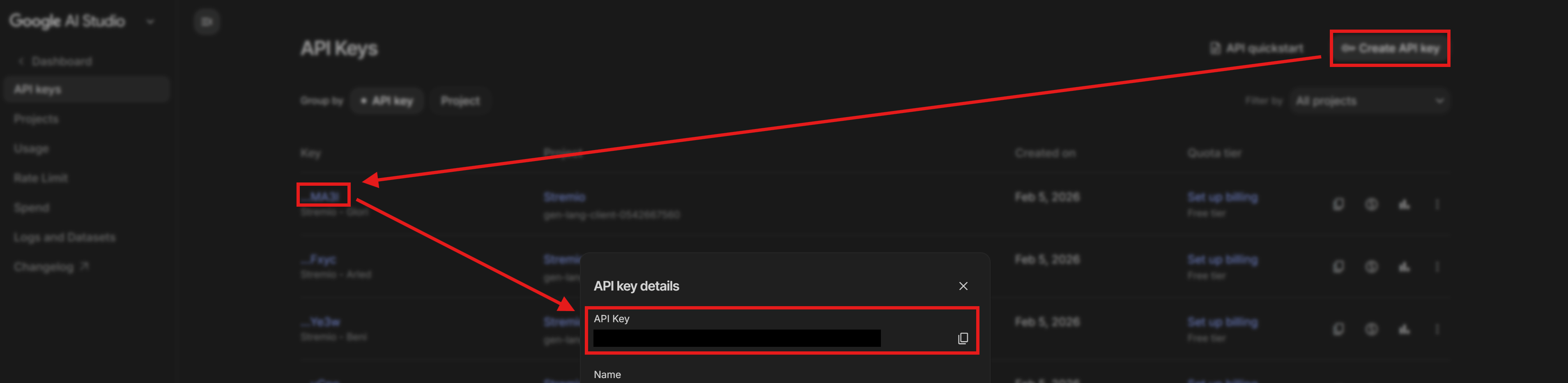
- An API key should normally get created automatically on the list, called “Default Gemini API Key”.
- Click on the clickable link on the “Key” column, and copy the “API Key”.
- If no key is created automatically, just create one by clicking “Create API Key” on the top right.
- Optional, but recommended for AI searches, to search not only for movie or show names, but also e.g. “movies like Batman” or more complex searches.
- (Optional) Totally optional and not a must at all, but if Trakt feels limiting with its rate limits or you want more curated lists, check out these friendly alternatives that work great with AIOMetadata:
- MDBList: Perfect for discovering user-curated catalogs and tracking your watched content seamlessly.
- Simkl: A Trakt-like experience with check-ins and watch history, plus extra flexibility.
- You can use them alongside Trakt or as a replacement for a smoother, more personalized setup.
- Head to 🛠️ Additional Stuff for easy setup steps.